Build n8n workflows with AI
Build, deploy, and debug n8n workflows in minutes by chatting with AI. No copy-pasting JSON, no screenshots, just results.
Trusted by teams at

















Everything you need to automate faster
Build workflows from scratch, edit them in plain English, and keep them self-healing. No code required.
Prototype with Copilot
Tell Copilot what you want to automate and it searches the knowledge base, applies best practices, using special tools and returns a working prototype you can test in minutes.
 Sonnet 4.5
Build with Synta MCP
Connect Synta MCP to Cursor, Claude, or any MCP client and make your AI client an n8n expert. It pulls node schemas, patterns and production templates to help build, edit, and deploy production-ready workflows.





Self-Healing Automation
Stop firefighting broken workflows. Synta MCP triggers test runs, reads live output from every node, pinpoints what failed, and rewrites the config — iterating until every execution passes.
Knowledge Base
Most AI tools hallucinate n8n configs. Synta's backend holds 800+ verified node schemas, real workflow patterns, and curated templates — so every node your AI touches is configured from ground truth, not a guess.
[00] HOW IT WORKS
/ PROTOTYPE → BUILD → VALIDATE
From idea to running automation in minutes. Prototype with Copilot, build and deploy with Synta MCP, then validate and self-heal until every execution passes.
[01] PROTOTYPE
/ RESEARCH → DESIGN → PLAN
Prototype with Copilot
Start in the Synta web app. Describe what you want to automate and Copilot searches the node database, reads best practices, and creates a workflow prototype and plan to quickly test and iterate on ideas.
Sonnet 4.5Prototype with Copilot
Start in the Synta web app. Describe your automation and Copilot creates a workflow prototype and plan to quickly test and iterate on ideas.
Start prototypingSonnet 4.5[02] BUILD & EDIT
/ CONNECT → BUILD → DEPLOY
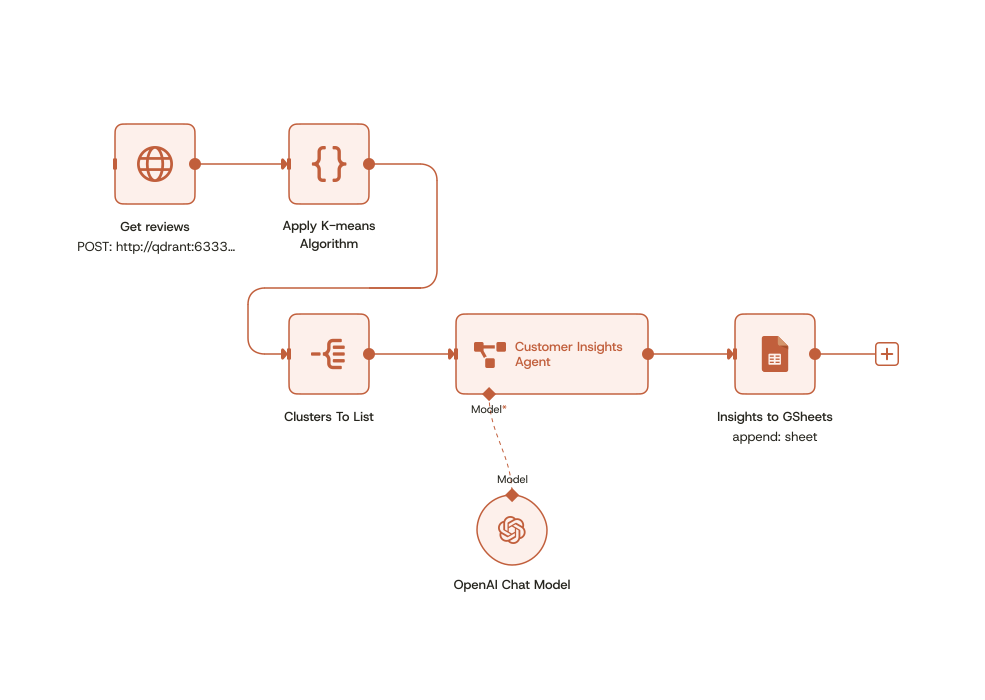
workflow_plan.md. Quick questions:Customer Review Analysis Pipeline
A 6-node workflow that fetches customer reviews, clusters them using K-means, runs an AI insights agent, and exports results to Google Sheets.
Trigger
HTTP Request → GET /reviews from Qdrant vector DB
Build & edit with Synta MCP
Once you have a prototype, take it further. Connect Synta MCP to Cursor or any MCP-compatible client. Your AI gets full access to our node database, documentation, workflow patterns, AI architectures, and best practices — then builds, edits, and deploys directly to your n8n instance.
Build & edit with Synta MCP
Connect Synta MCP to Cursor or any MCP-compatible client. Full access to node docs, workflow patterns, and best practices — deploy directly to n8n.
Connect Synta MCPworkflow_plan.md. Quick questions:[03] VALIDATE & SELF-HEAL
/ TEST → DIAGNOSE → FIX
Self-heal with Synta MCP
After deploying, Synta MCP triggers executions, inspects runtime data from every node, diagnoses errors, and auto-fixes issues. Your AI iterates until every test passes — no manual debugging.

Test & self-heal
Synta MCP diagnoses broken workflows and auto-fixes issues. Your AI iterates until executions pass.
See the MCP in actionStart with a 3-day free trial of Standard.
Full access to Copilot and Synta MCP. Build, deploy, and debug n8n workflows with AI.
Start with a 3-day free trial of Standard.
Full access to Copilot and Synta MCP. Build, deploy, and debug n8n workflows with AI.
[05] MCP CLIENTS
/ CONNECT YOUR TOOLS
Works with your favourite AI clients. Use Synta MCP with the tools you already use, including Cursor, Claude Code, ChatGPT, and more.
Get started with Synta MCP






[06] BEFORE / AFTER
/ THE SYNTA DIFFERENCE
Stop wasting time on manual workflow building. Every hour you spend copying JSON and debugging nodes is an hour you could spend on what actually matters.
[07] PRICING
/ FIND YOUR PLAN
Build n8n workflows faster. Find a plan that works for you.
3-day free trial includes 40 AI credits. Cancel anytime.
- 150 credits per month
- Up to 10 AI-generated workflows
- Direct deployment via Synta MCP
- Basic debugging assistance
- Standard workflow templates
- Email support
- 450 credits per month
- Unlimited AI-generated workflows
- Direct deployment via Synta MCP
- Advanced debugging & optimization
- Custom node recommendations
- Priority AI support
- Team collaboration features
- Advanced workflow templates
- Unlimited credits
- Direct deployment via Synta MCP
- Dedicated account manager
- Custom integrations
- SLA guarantees
- Advanced security features
- Priority support 24/7
- Custom training & onboarding
- Volume discounts
[08] FAQ
/ COMMON QUESTIONS
Frequently asked questions.
What is Synta?+
How does Synta generate workflows?+
What is Synta MCP and how does it work?+
Do I need to export workflows manually?+
Can Synta help debug existing workflows?+
Is Synta compatible with n8n?+
Do I need coding experience to use Synta?+
Is there a free trial available?+
How accurate are the AI-generated workflows?+
Ready to build better workflows?
Join teams automating with Synta. Start building workflows with AI assistance today.